Showing posts with label pc. Show all posts

Friday, October 10, 2008

Brainwave Controlled Game From Square Enix


zombies-alive writes "Square Enix and Neurosky, maker of wearable sensory equipment, are coming out with a new 'Brainwave-Controlled' RPG. The game will be demonstrated at the Tokyo Game Show for the (Windows) PC, which features the NeuroSky MindSet headset. At this moment, the headset only detects the gamer's level of concentration and relaxation by means of a single electrode placed on the forehead."

Source Slashdot

Thursday, October 9, 2008

PS2/PS3/PC version of the Access Controller now shipping


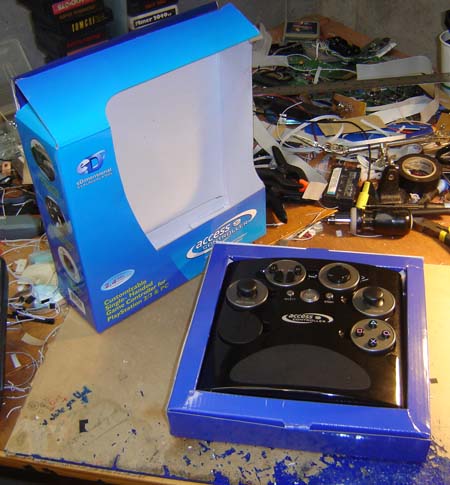
The time has come! The PS2/PS3/PC version of the Access Controller is now shipping, in case the headline above somehow slipped your view.

There's nothing quite like unboxing a box you designed...
Unboxing the unit. I went with a much simpler “blue” look for the box this time, with a couple Easter Eggs on there as well.

You can use the link over on the right-hand side of the site to place your order and read more about the unit. I guess you could also click right here, wow copy/paste is awesome!

We’re still working on the Xbox 360 version (review process and what not) and will keep you posted once we know more. But yes, for the Sony and PC fans though you’re ready to go… hope it works well for you!

Coming next week: a How-To guide on modding this controller to add your own peripherals. Yes, that’s right - how to hack a Benheck product.

I had no reservations about running this cheesy image

The bus-like nature of the module plugs and the fact there’s always one empty make this quite doable and easy. Add a foot pedal to better help those in need, a larger joystick, all sorts of stuff… stay tuned!
Source ben heck

Thursday, September 25, 2008

Gyration Is Back With... Another Air Mouse...


Remember Gyration's range of 'air mice'? They didn't do too well in the UK and the company seems to have adopted an almost shameful silence over the last couple of years.

With no mention towards its previous foray in this area it seems to be trying again, and in the hope that we forgot why we didn't buy them a few years ago has released a new Air Mouse device to the UK market.

In case you don't know, Gyration devices typically adopted a Wii-style system by using in-air motion tracking to control a mouse cursor on screen.

They're designed primarily for business professionals to help them conduct presentations from afar but have a reasonable claim for offering a bit more control in the home media market, much like yesterday's rather more straightforward remote control.

However with Gyration's device you can use flicks of the wrist to invoke certain commands and it uses RF technology which means it'll work up to 100 feet away and through walls (why do we need to know that?).

The Air Mouse with Motionsense is available from October for a recommended retail price of £69.99, and you can find out more from the link below.
gyration
Source gizmodo.

Sunday, September 21, 2008

How to Use the Playstation 3 Controller in Windows Vista


Hardcoreware writes, "So after picking up an emulator (I opted for Nestopia, which works very well in Vista by the way) I had to find a controller. As it turns out, I am very picky about controllers, especially for playing older games. When I play an NES game, I want something that is as close to an NES controller as possible. When I play SNES, I want a SNES controller. That’s why I love the Wii Remote and Classic Controller so much; they do a very good job of emulating the feel of the originals (I just wish we could remap the buttons on the Classic, so we can use Y and B as B and A - if you’ve played Super Mario All Stars on SNES, you will know what I mean).

But for the PC, decent controllers are few and far between. There are custom controllers out there - NES and SNES controllers converted to USB that natively support the latest operating systems. Cheap adapters are out there as well; everything from the NES controller to the DualShock 2 can be used with these. I needed one now though, and my choices were the XBOX 360 controller (no thanks, that cross pad is absolutely wretched), the gamepad that came with the Foxconn GeForce 7950 GT we reviewed last year (appreciate that they threw it in, but the cross pad is even worse than the 360’s), or one of my Playstation 3 controllers - DualShock 3 and original SixAxis. These controllers are pretty much perfect, as they have a nice cross pad feel, and a layout similar to the SNES.

If you’ve tried to install a SixAxis or DualShock 3 on a Windows Vista PC, I think you know where I’m going with this. It is actually identified in the Game Controllers section of the control panel, but doesn’t seem to accept button inputs."

Source hardcoreware.

Friday, August 29, 2008

Operate Your Computer with Wii Controllers


Nintendo doesn't exactly advertise it, but the remotes for the Wii gaming console—including the balance board that comes with Wii Fit—have Bluetooth capabilities. That means you can connect your Wii peripherals to your computer to operate the media center hooked up to your TV, play emulated games with a Nunchuk, Classic Controller, or even a Balance Board, and pretty much have them do anything you can do with a keyboard. Let's walk through linking up your Wii peripherals and putting them in control of your Mac, PC, or Linux box.

To give you an idea of what you can do with a Wii/PC hook-up, here's a look at one neat example: Controlling Windows Media Center from a distance, without having to shell out for a separate remote control.
here

Source lifehacker

Saturday, August 23, 2008

chrome joypad is a shiny fingerprint magnet


I don’t care how much I have to buff my oily prints off of this chrome joypad. I want one. I can’t believe in all of the years that game controllers have been made that nobody has thought to make one before. And yes, this one isn’t some cheap plastic masquerading as chrome. It’s actually made from metal.

This polished chrome joypad comes to us courtesy of China’s Dream Cheeky, makers of all sorts of fun USB gadgets and gizmos. The shiny metal controller features an 8-way directional pad, four game buttons, start/select buttons and shoulder triggers. The back of the controller is covered with rubber, giving you a better grip than if the entire thing were slippery metal.

It plugs into the USB port on any PC (there’s conflicting info on Mac compatibility), and offers shiny gaming goodness for your computer games. They’ve also got a nifty chrome USB hub, if you don’t have a spare port to plug this thing into. Now all I need is a version that’ll work with my PS3 or Xbox 360 and I’ll be really happy.

No word yet on pricing or where you can pick one of these shiny things up, but while you’re waiting, check out the other cool stuff over on the Dream Cheeky website.
Source technabob

Wednesday, August 20, 2008

Microsoft intros SideWinder X6 keyboard and X5 mouse

We had a hunch that Microsoft would be launching a SideWinder-branded keyboard this fall, and sure enough, the suits in Redmond are keeping the revitalized name alive with an all new September-bound input peripheral combo. The SideWinder X6 is hailed as the "first gaming keyboard created by Microsoft from the ground up, and the only gaming keyboard on the market with a switchable key pad." When not in gaming mode, the key pad transforms into a full-programmable macro pad. You'll also find two-color adjustable backlighting, mode switching and a $79.95 price tag. As for the X5 mouse, this critter packs nine buttons (five of which are customizable), a 2,000DPI laser tracking engine, six DPI settings (adjustable on the fly) and a $59.95 sticker.
Source engadget

Monday, August 11, 2008

Avatar gaming mouse released

Engadget have posted news on the release of the Avatar gaming mouse:

Yeah, we've seen the cart come before the horse before, and such is the case with NZXT's Avatar gaming mouse. Shortly after being previewed, the outfit has done its duty and made things official. Specs wise, we're looking at 7 customizable buttons, a 2,600DPI optical sensor, 4-speed DPI switich, ambidextrous design and a rubber grip to keep your palm secure even the sweat really gets to pourin'. Its available now to challenge your razer for $59.99.